Web Design Principles: A Comprehensive Guide for Beginners

A well-designed website is the cornerstone of any successful online presence. Whether you’re building a personal blog, an e-commerce store, or a corporate website, understanding fundamental web design principles is essential. For beginners, the process may seem overwhelming, but breaking it down into key concepts makes it manageable. This guide will walk you through the core principles of web design, ensuring your site is both visually appealing and functional.

web design principles

Top 15 Web Design Principles

Here are the top 15 web design principles every beginner should know.

1. Define Your Website’s Purpose

Clearly understanding your website’s purpose ensures that all design elements align with its goals. Whether it’s informing, selling, or entertaining, clarity in purpose helps create a focused structure, enhances usability, and ensures visitors instantly grasp what the site offers and why it matters. A reliable web design company will start the project only after thoroughly studying the website’s purpose.

2. Simplicity in Design

Simplicity eliminates distractions and ensures a clean, professional appearance. Stick to a minimalistic layout, limit your color palette, and use legible typography. A simple design helps users focus on content or actions, enhancing their overall experience without overwhelming them with unnecessary elements.

3. Visual Hierarchy

Visual hierarchy organizes content to guide users’ attention to essential elements first. Use size, color, contrast, and placement to highlight key areas like headings, buttons, or images. A strong hierarchy ensures users easily understand your message and navigate your website intuitively.

4. Responsive Design

Responsive design ensures your website functions seamlessly across devices, including desktops, tablets, and smartphones. By adapting layouts to different screen sizes, you enhance usability and maintain visual appeal, improving user engagement and ensuring compatibility with the growing mobile-first audience.

5. Intuitive Navigation

Easy navigation helps users find information quickly and enhances their experience. Use clear menus, logical structures, and consistent placement of navigation elements. Incorporating features like breadcrumbs or a search bar can further simplify access to deeper pages or content sections.

6. Accessibility for All

An accessible website ensures usability for everyone, including people with disabilities. Use features like alt text for images, sufficient color contrast, and keyboard-friendly navigation. Accessibility not only promotes inclusivity but also improves user satisfaction and adheres to ethical and legal standards.

7. Consistency Across Pages

A consistent design creates a cohesive experience for users. Use the same fonts, colors, and button styles throughout your website. Consistency builds trust and familiarity, ensuring users can navigate smoothly without relearning the layout or functionality on every page.

8. High-Quality Content

Quality content is crucial to engage users and communicate your message effectively. Pair concise, error-free text with relevant visuals like images, videos, or infographics. Valuable content not only retains visitors but also supports your website’s primary objectives, whether it’s to inform, sell, or entertain.

9. Fast Loading Times

Website speed directly impacts user satisfaction and search rankings. Optimize images, leverage caching, and use efficient coding practices to ensure quick load times. A fast-loading website reduces bounce rates, keeps users engaged, and delivers a seamless browsing experience.

10. Mobile-First Approach

Designing for mobile devices first ensures your website meets the needs of the majority of users. Focus on touch-friendly navigation, scalable visuals, and legible fonts. A mobile-first strategy improves usability and ensures compatibility across all devices, including desktops and tablets.

11. Focus on Call-to-Actions (CTAs)

Call-to-action buttons guide users toward desired actions like signing up, purchasing, or contacting you. Make CTAs prominent by using contrasting colors, clear text, and strategic placement. Effective CTAs drive engagement and help achieve your website’s objectives efficiently.

12. User-Centered Design

Always design with the user in mind. Prioritize intuitive layouts, fast responses, and accessible features. Conduct user testing to identify pain points and improve usability. A user-centered approach ensures your website meets visitor expectations and keeps them engaged. Read more about a website design company that creates user-focused designs to ensure a seamless and engaging user experience.

13. Readability and Typography

Readable text enhances comprehension and ensures users stay engaged. Choose clean fonts, proper spacing, and appropriate font sizes. Organize content into headings, subheadings, and bullet points for easy scanning. Good typography makes your content accessible and visually appealing.

14. Effective Use of Whitespace

Whitespace, or negative space, prevents clutter and improves content focus. By giving elements room to breathe, you enhance readability and visual appeal. Whitespace balances design elements, creating a clean, modern look that guides users through your content effortlessly.

15. Continuous Testing and Optimization

Web design is an evolving process. Regularly test your website for usability, performance, and responsiveness. Use analytics and feedback to identify areas for improvement. By continuously refining your design, you maintain relevance, improve user satisfaction, and stay ahead of competitors.

Final Thoughts

Web design is both an art and a science. By understanding and applying these principles, beginners can create websites that are not only visually appealing but also functional and user-friendly. Start with these fundamentals, and as you gain experience, experiment and evolve your designs to meet the needs of your audience.

About the Author

The article is written by a website copywriter employed at a web design agency. Visit his website to understand the services they provide.

Useful Links:

https://business.adobe.com/blog/basics/how-to-design-a-website

Essential Web Design Guidelines for Modern Online Experiences

In today’s digital age, a well-designed website is the cornerstone of any successful online presence. Whether you’re building a personal blog, an e-commerce platform, or a corporate website, adhering to web design guidelines is crucial to creating a user-friendly and visually appealing online experience. This article delves into the fundamental principles and guidelines that can help you craft a website that not only captures attention but also offers seamless navigation and optimal functionality.

web design guidelines

Important Web Design Guidelines

Check out the essential website design guidelines

1. User-Centric Design: Put Users First

User-centric design revolves around understanding and catering to the needs and preferences of your target audience. Conduct thorough user research to gain insights into their behaviors, motivations, and pain points. By creating user personas, you develop a clear picture of your ideal visitors, helping you tailor your website’s design to their expectations. User-centric design translates into intuitive navigation that guides users effortlessly to the information they seek. It also involves organizing content logically, providing easy access to important features, and delivering a seamless and enjoyable user experience that encourages engagement and conversions.

2. Responsive Design: Adapt to All Devices

Responsive design ensures that your website displays and functions optimally across a diverse range of devices, from smartphones to desktops. This design approach uses flexible layouts, fluid images, and CSS media queries to adjust the content and layout based on the screen size. With the majority of users accessing websites through mobile devices, a responsive design is crucial for providing a consistent and user-friendly experience regardless of the device. This not only enhances user satisfaction but also positively impacts your website’s search engine ranking, as search engines like Google prioritize mobile-friendly sites in their results.

3. Clear and Consistent Navigation: Guide Users Intuitively

Navigation is the roadmap that guides users through your website. Clear and consistent navigation menus make it easy for users to find what they’re looking for. Organize menu items logically, using descriptive labels that accurately represent the content within each section. Breadcrumb navigation aids users in understanding their location within the website’s hierarchy. Visible calls-to-action (CTAs) prompt users to take desired actions, such as making a purchase or signing up for a newsletter. Effective navigation reduces user frustration, encourages exploration, and ensures that users can easily locate the information they need.

web design guide

4. Visual Hierarchy: Direct Attention Effectively

Visual hierarchy involves arranging elements on a webpage in a way that guides users’ attention and emphasizes the most important content. Larger font sizes, bold typography, contrasting colors, and strategic spacing create a hierarchy that draws users’ eyes to key elements like headlines, CTAs, and essential messages. By organizing content in a visually engaging manner, you help users quickly understand the page’s main message and encourage them to explore further. Effective visual hierarchy enhances user engagement and ensures that users absorb the information you want to convey.

5. Readability and Typography: Prioritize Content Clarity

Choosing the right typography enhances readability and user engagement. Opt for legible fonts that are easy to read on screens of all sizes. Maintain consistent typography across your website for a cohesive and professional appearance. Adequate line spacing (leading) and font sizes enhance readability, especially on smaller screens. High contrast between text and background improves accessibility, making your content accessible to users with visual impairments. Well-chosen typography not only conveys your message effectively but also contributes to a positive user experience.

6. Minimize Loading Times: Optimize Performance

Slow-loading websites frustrate users and can lead to higher bounce rates. Optimize your website’s performance by compressing images and utilizing modern image formats. Implement lazy loading to load content as users scroll down the page, reducing initial loading times. Minimize the use of unnecessary scripts and plugins that can slow down your website. A fast-loading website improves user satisfaction, keeps visitors engaged, and positively influences your website’s search engine ranking.

website design principles

7. Consistent Branding: Establish Visual Identity

Consistent branding creates a cohesive and memorable user experience. Align your website’s color palette, fonts, logos, and imagery with your brand’s identity and values. This visual consistency builds brand recognition, fosters trust, and reinforces your unique identity in users’ minds. Whether users land on your homepage or navigate to other pages, they should encounter a unified visual identity that reinforces your brand’s message and offerings.

8. Accessibility: Inclusive Design for All Users

Web accessibility ensures that your website is usable by individuals with disabilities. Following Web Content Accessibility Guidelines (WCAG) ensures that your website is perceivable, operable, understandable, and robust for all users. Incorporate alternative text (alt text) for images to assist users with visual impairments. Implement keyboard navigation for users who cannot use a mouse. Consider color contrasts for users with low vision. Prioritizing accessibility not only broadens your website’s audience but also demonstrates your commitment to inclusivity and social responsibility.

9. Optimal Content Layout: Balance Visuals and Text

A well-designed content layout strikes a balance between visuals and text, making it easy for users to consume information. Use white space strategically to prevent clutter and make content more digestible. Break up lengthy text with headings, subheadings, bullet points, and visuals to improve readability and engagement. Grid-based layouts provide structure and consistency, helping users navigate through the content effortlessly. Understanding reading patterns, like the F-pattern and Z-pattern, allows you to strategically place important content elements where users are likely to look.

10. SEO Integration: Enhance Discoverability

Search engine optimization (SEO) is essential for improving your website’s visibility in search engine results. Incorporate relevant keywords naturally within your content, meta descriptions, and image alt text. Create descriptive URLs that convey the content of the page. Use header tags (H1, H2, H3, etc.) to structure your content hierarchically. By implementing SEO best practices, you increase the chances of your website ranking higher in search engine results, which in turn drives organic traffic and improves your website’s discoverability.

web designing rules

Summary of Web Design Guidelines

Designing a successful website requires a comprehensive understanding of these ten key web design guidelines. By putting users first, embracing responsive design, ensuring clear navigation, establishing effective visual hierarchy, prioritizing readability, optimizing performance, maintaining consistent branding, fostering accessibility, structuring content optimally, and integrating SEO, you can create a website that engages users, meets their needs, and leaves a lasting positive impression. These guidelines form the foundation for an exceptional online experience that not only captures the essence of your brand but also ensures that your website remains relevant and competitive in today’s digital landscape.

Useful Article:

https://xd.adobe.com/ideas/principles/web-design/web-page-design/

https://www.webdesigncochin.in/how-to-create-a-landing-page-that-converts/

https://moz.com/blog/responsive-web-design-the-ultimate-guide-for-online-marketers

https://yoast.com/what-makes-a-good-website/

https://www.pixelsolvent.com/web-design-company-in-bangalore/

https://www.semrush.com/blog/seo-web-design/

Top 10 Tips to Make Mobile Landing Page That Can Increase Your Revenue

Building a mobile landing page is now a necessity for business websites. It can give many benefits for them. Since many people are using the internet through smartphones, having web pages optimized to run on mobile devices can attract more people to the website and increase their sales.

The WooCommerce development company in India wooxpert is making sure their eCommerce websites have mobile landing pages to increase the conversion from mobile users.

mobile landing page

What is a Mobile Landing Page?

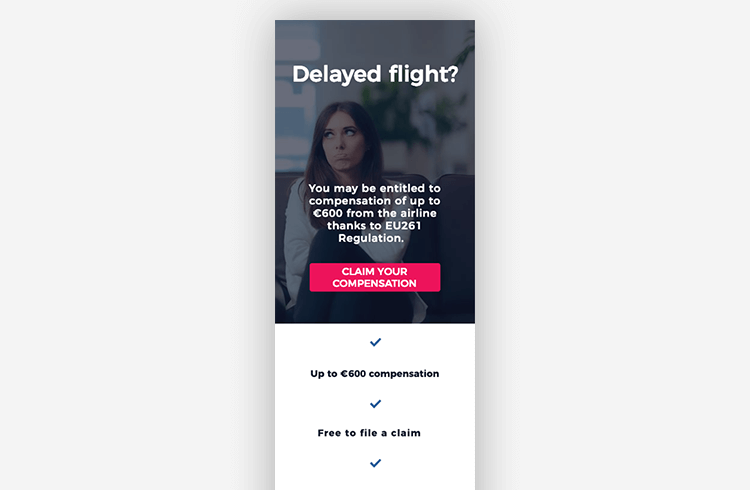
Before reading the tips, you should understand what is a mobile landing page. Those are the web pages created specifically for mobile browsers. These pages will appear as ads on search engine result pages when customers searching something on mobile phones. This type of landing page must have a responsive design, one call to action, and simple navigation. They are aimed to make the users do an exact action. Shopify development company in India shopixpert is also good at creating such pages.

best mobile landing pages

List of Top Tips to Make Mobile Landing Page

The best mobile landing pages grab the attention of potential customers, demand action, and get the conversion. When a customer finds himself on a well-crafted mobile landing page that gives them a better user experience and creates a positive impression. This is why the pixelsolvent web design company in India gives importance to creating mobile-optimized pages. See some of the important landing page optimization tips followed by them.

mobile landing page designs

1. Create a separate mobile landing page

Having a responsive design is definitely good for the website. But that is not enough. Develop a website specifically for mobile devices or else they are not going to convert the way you want them to. The web development company in India webin360.com can deliver landing pages designed for mobiles.

best landing pages

2. Use click-to-call

If important information like inventory, pricing, business hours, etc., are not available on your website. Using a click-to-call button that is easy to spot and big enough to click. This can help them easily contact you to get the information they need. The web designing company in Kochi www.webdesigncochin.in is effectively using click-to-call button in their client’s websites.

landing page

3. Implement Click-to-Scroll

In most cases, shorter landing pages are better. But sometimes you may want to add more information on the landing page, in those cases, you can use the click-to-scroll button to quickly navigate the users to the information they need. This will reduce bounce rates. The web design company in Calicut zealoteck.com is experienced in implementing these types of buttons.

mobile first website

4. Use sticky headers and footers

For a small mobile screen, the screen real estate is very precious. But still, it is important to keep your call to action or navigation on the landing page easily accessible. Sticky navigation lets you achieve this. Therefore, many expert web designers in Kochi freelancewebdesigner help you add sticky headers and footers on the landing pages.

wordpress landing page

5. Craft shorter website copy

Your mobile landing page shouldn’t have all the website copy from your desktop site. You need short and simple content which helps the site visitors quickly understand the purpose of the page. Website content writers in the SEO company in India RankPointer can deliver such shorter website copy.

landing page examples

6. Use mobile-optimized popups

Popups can be very useful and effective for lead generation on mobile landing pages. As part of optimizing these popups, keep them simple as possible. Limit the popup with just a few elements or even just an email address. The web designers in the outsource web design company in India www.outsourcingserviceonline.com can create simplistic popups.

7. Go easy on visuals and videos

Images and videos use a lot of cellular data or Wi-Fi. So, when you are creating landing pages for mobile devices you should keep images to a minimum. For videos, you should try to avoid them completely or make sure they are not auto-play videos. The web design company in Dubai alcobyte.com is using this principle in its designs.

website landing page

8. Make it fast

Website loading speed is an important factor in user experience. If the website takes a lot of time to load hat will increase the bounce rate. Optimize every component on the website to reduce loading time. Wpcodeup.com WordPress development company in India makes sure the web pages are loading faster.

9. Stick to Single Column Layouts

Mobile devices don’t have enough room to show multiple columns of a website. Anything more than a single column makes navigation difficult on mobile devices. Therefore, the best web design company in Kerala webdesigninkerala creates single-column landing pages for mobile phone users.

10. Use white space

The use of white space makes the website look modern and creates interest among customers. It also gives enough importance to each element on the website like the website copy, call-to-action (CTA), etc. The top Magento development company in India Magentomate implements this technique in their designs.

landing page best practices

Top 10 Tips to Make Mobile Landing Page – Summary

The tips given in the article will guide you to create an effective landing page for mobiles.

Related Links:

https://docs.microsoft.com/en-us/dynamics365/marketing/create-landing-page

https://en.wikipedia.org/wiki/Landing_page

Tips to Find Suitable Web Design Company in Dubai UAE for Your Business Website

A web design company in Dubai is something you can trust to deliver the best performing eye-catchy website. But there are several options for you to choose from. So this article is for helping you to choose the suitable one by using some simple tips.

Web Design Company in Dubai
Creative Web Design Sydney NSW

7 Tips to Find the Best Website Design Company in Dubai

The 7 important tips to choose the right website design agency in Dubai for you.

1. Clear About Your Requirements

The first thing you should do for hiring a web designing firm is that have a clear picture of your requirement. Then you compare them with the skillsets of each agency. If the agency didn’t possess the kind of designers and developers like you are expecting, you shouldn’t work with them.

web design services dubai

2. They Must Have a Portfolio

The agency you are looking for should have a portfolio. A portfolio contains a sample of their past works and clients. So you can see the ability of the designers by reviewing these works. Look for the websites they made which are similar to what you have planned to own. If that website is user-friendly and reaches up to the standard you are expecting, then they may be the right choice.

3. They Have Other Services

Try to choose a company with complete web designing solutions. This can improve the effectiveness of the website. Because a web development agency with graphic designing, logo design, SEO, social media marketing, and all other services related to making your online presence more effective is always good. If you choose an eCommerce web design Dubai company, then you can easily expand your business to online sales.

4. Check Out the Reviews

You should do some research on the company you are about to hire. The reviews by their clients are valuable information. There are many ways to see the reviews. The simplest and familiar one for everyone is Google. Google lets you review web designing agencies and potential clients can read the reviews to make the right decision.

web design dubai

5. Familiar with Design Trends

For a website to perform well, it should follow the latest design trends. The customers usually tend to trust the businesses with a modern looking website. This trust is important for conversion. The designer must be up to date with the trends in the industry like flat design, parallax effects, and all the other elements. Some basic information about web design trends that you need to know is can be seen here.

6. Analyze How They Communicate

Communication is crucial in designing a good website. The designer should able to understand the requirement of the client. Observing their response helps you know their communication skills. From the way they communicate, you can confirm whether they understand it or not.

7. They Have Their Own Ideas

The designer must present their ideas to you. Creating a replica of your words is something most designers can do. But talented designers like the web designers in the UAE will give you tons of ideas for making your website more appealing. That kind of designers can make better performing websites for you.

web design agency dubai

To Sum It Up – Tips for Finding the Right Web Design Company in Dubai

Websites are a tool for advertising a firm. They will get you more customers by utilizing them properly. But to do so, you need to find a suitable agency who can design an outstanding website for you. This article some of the tips you can use while trying to find a website designing agency.

About the Author

The Author is working as a web designer at www.freelancewebdesigner.biz for over the past 12 years. He is also very much experienced in content writing and digital marketing.

Good Website Design Principles: The Top 8 Points You Should Consider

Here we are explaining some of the good website design principles to help you in your web designing job.

The designs of the websites can decide their success. The productivity of the website can decide its success rather than the looks. A website is the face of their business. So you should do the designing of it very carefully. Missing even a small factor could affect the sites and their brand reputation. The web design has a crucial role in increasing conversion.

Good Website Design Principles

The web designing not necessarily mean how the site looks. It is more like how the site works. A website with simple design and outstanding features can attract more new visitors and can have better search engine rankings.

8 Principles of Good Website Design

A better web design requires the collective effort of many professionals from different areas of website designing. This article is going to give you the essential 8 web design principles.

1. Simplicity

The web designs should be minimalistic. Adding so many elements to the website will only confuse the visitors. Maybe they can be distracted from the main purpose of that website. Also, minimal layout helps the users to easily navigate. So making it simpler is the most efficient way to attract people.

2. Consistency

You should keep the consistency of the website’s designs throughout the page. This means the elements of it like fonts, font sizes, colors, buttons, headings, sub-headings, etc. should match one another. The CSS can give you a detailed idea about the elements.

web usability guidelines

3. Typography & Readability

Text elements on a website have an extra point over others. Because the search engine crawlers are looking for this data. Therefore, the typography should look good, readable for users, along with the major SEO elements. Use appropriate typefaces for design elements like headings, body, buttons, etc.

4. Mobile Compatibility

The mobile industry is growing fast. So while designing a website you should consider making them compatible with different screen sizes for supporting in both smartphones and tablets. If your website is not responsive your customers may go to your competitors.

best web design

5. Color Palette and Imagery

The best choices of color can attract the users and a poor combination of colors can cause distraction. So picking the right color palette is very important to convey the vibe of that website to the visitors. Remember to leave some whitespace. Otherwise, the web page will look cluttered. Don’t make a mess with colors. Use only three or four colors. The same goes for the case of images. Keep it simple.

6. Enhanced Loading Speed

Everyone hates the websites that take so much time to load. This hate can benefit the competitors if they have a website with quick loading speed. To avoid this, you have to optimize the image sizes, combine the code into a central CSS or JavaScript file because it reduces HTTP requests. Compressing CSS, HTML and JavaScript can also improve the loading speed.

7. Easy Navigation

Probably the visitors will spend more time on websites with easy navigation. For having a better navigation, you should create a logical page hierarchy using breadcrumbs and clickable buttons. You can follow the three-click rule.

8. Communication

Everything you are doing to improvise the website is for giving the users what they are looking for on your website. To have effective communication with visitors, organize the information by using headlines, sub-headlines, bullet points, etc. rather than long paragraphs.

web design principles

To conclude the Good Website Design Principles

If you follow the above-mentioned principles, you can get innovative website design. The site will be perfect in both aesthetically and functionally. This basic knowledge will help you build a better website.

You can also check more web design principles on w3.org.

The author of this article is a Digital marketing consultant in zionwebdesign, is a leading web design company in houston texas.